

 News
News


Important before downloading
Some antivirus programs may incorrectly detect the game's anti-cheat protection as a virus.
We recommend adding the game folder to your antivirus exclusions.
Download MU Optinet
🎥 3D Camera
To enable 3D Camera, open SETTINGS.INI in your game folder.
Enabled = 0 ↓ change to ↓ [3DCameraMode]
Enabled = 1
🛠 Having problems?
If you have problems starting the game or have any questions, contact us and we will help you.
Contact usMissing main.exe
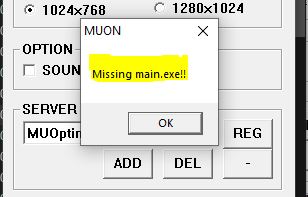
If you see this error, main.exe was probably removed or blocked by your antivirus or Windows Defender.
▶ Open Video Instructions⚙ The game won't start / main.exe has stopped working
If the game fails to launch entirely or you receive the error "main.exe has stopped working", follow the steps below.
-
Right-click on This PC / My Computer and select Properties.

-
Select Advanced System Settings.

-
In the Performance section, click Settings.

-
Open the Data Execution Prevention tab.

-
Select Turn on DEP for essential Windows programs and services only .
